
Dragon Lady – NOW WITH AI
The Complete Dragon Lady Experience
Workflow:
- Guest uploads old Friendster photos
- Scraper downloads/processes locally
- Saves to /imported/
- Llama captions old photos
- Merges with cruise photos
- All stays on boat (private)
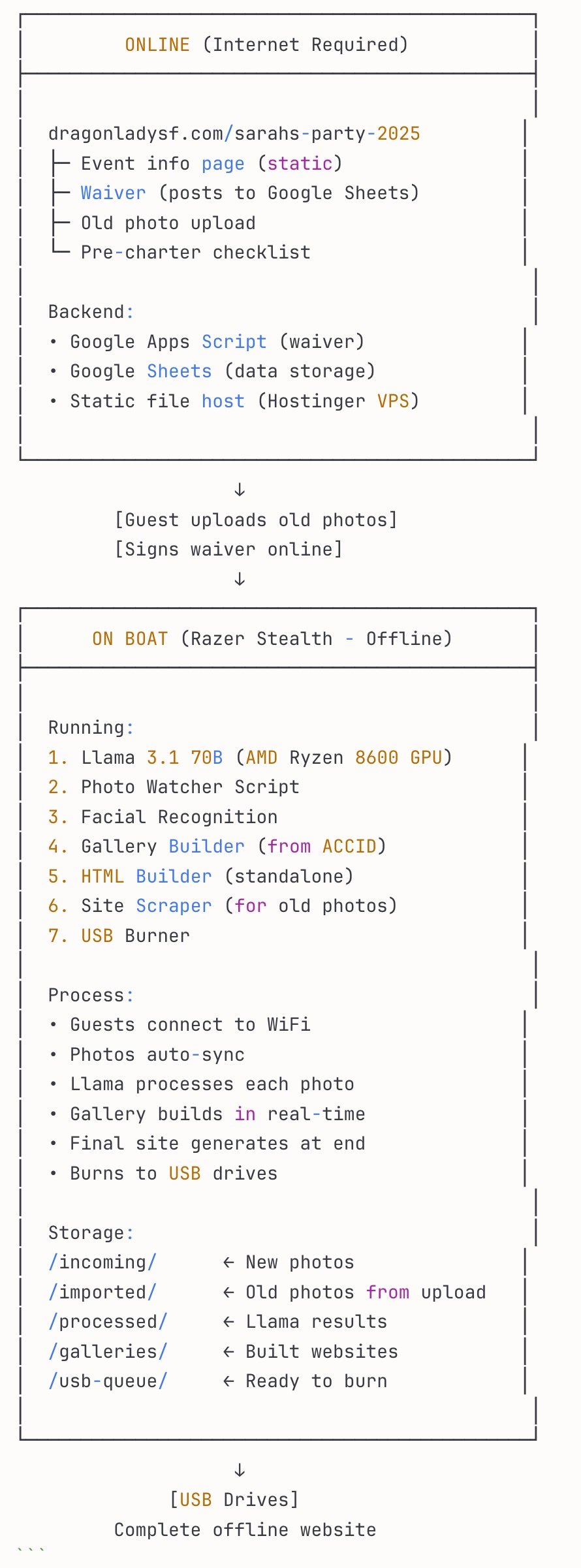
1. BOOKING → Custom Link Created
Jerry books "Sarah's 40th Birthday Party"
System generates: dragonladysf.com/sarahs-party-2025

This link controls EVERYTHING for this charter
2. PRE-CHARTER: Guest Info Portal
Guests visit: dragonladysf.com/sarahs-party-2025

They see:
┌─────────────────────────────────────┐
│ Sarah's 40th Birthday Cruise        │
│ Dragon Lady - June 15, 2025         │
├─────────────────────────────────────┤
│ YOUR TRIP INFORMATION               │
│                                     │
│ 📅 Event Details                    │
│   • Date: Saturday, June 15         │
│   • Boarding: 6:00 PM               │
│   • Departure: 6:30 PM              │
│   • Return: 9:30 PM                 │
│   • Location: Pier 40, SF           │
│                                     │
│ 👥 Guest List (12 people)           │
│   • John & Mary Smith               │
│   • Mike Chen                       │
│   • etc.                            │
│                                     │
│ 📋 What to Bring                    │
│   • Light jacket                    │
│   • Valid ID                        │
│   • Dancing shoes!                  │
│                                     │
│ 🚗 Parking & Directions             │
│                                     │
│ ✍️ [SIGN WAIVER] (pre-sign before)  │
│                                     │
│ 📸 Add Your Old Photos              │
│   [Upload photos you want included] │
│   (Anniversary? Wedding? Old trip?) │
│                                     │
│ 🎵 Song Requests                    │
│ 🍽️ Dietary Restrictions             │
│                                     │
│ [Explore Full Dragon Lady Site →]  │
└─────────────────────────────────────┘
3. PRE-UPLOAD: Guests Add Old Photos
Sarah uploads:
- 1999 wedding photos
- 2000-2010 Friendster album
- Old vacation photos

System:
1. Stores in /uploads/sarahs-party/imported/
2. Llama analyzes & captions
3. Facial recognition starts learning faces
4. Ready to merge with cruise photos
4. WAIVER SIGNING (Already Built)
Guest clicks "Sign Waiver"
→ Electronic signature capture
→ Saves to Google Sheets
→ Status updates: "✅ Waiver signed"

Jerry can see at a glance who's signed
5. CHARTER DAY: Photo Collection
6:00 PM - Guests board
         - Connect to "Dragon Lady Guest" WiFi
         - Photos start auto-syncing

Photo Watcher Script running on Razer:
→ Detects new photos
→ Llama captions each one
→ Facial recognition identifies people
→ GPS tags location on SF Bay
→ Categorizes automatically
→ Updates live gallery

Guests can see photos appearing in real-time at:
dragonladysf.local/sarahs-party/photos
6. END OF CRUISE: Auto-Generation
9:30 PM - Captain clicks "Finalize Event"

Llama generates:
1. Complete event story
2. Timeline of the evening
3. "Then & Now" with old photos
4. Highlights reel
5. Full gallery with categories
6. Guest list & info page (for memories)
7. Interactive SF Bay map

System builds:
→ Complete HTML website
→ Burns to USB drives
→ Ready in 2 minutes

Crew hands USB to each guest:
"Your photos are ready!"
7. USB CONTENTS
DRAGON_LADY_SARAHS_PARTY/
├── START_HERE.html
├── /website/
│   ├── index.html (event story)
│   ├── info.html (what you saw in step 2)
│   ├── timeline.html
│   ├── then-and-now.html (old photos merged)
│   ├── gallery.html
│   ├── map.html (SF Bay GPS)
│   └── /photos/
│       ├── /tonight/
│       ├── /memories/ (old photos)
│       └── /all/
└── /downloads/
    └── all-photos.zip
WHAT YOU ALREADY HAVE BUILT
✅ Complete Systems Ready:
- Photo Sorter (AI categorization)
- Gallery Builder (3 templates)
- HTML Builder (standalone, can move to Razer)
- Site Scraper (import old sites as JSON)
- Waiver System (electronic signatures → Google Sheets)
- Boat WiFi (works offline)
🔨 Need to Build:
- Link Generator (“encrypter” for custom codes)
- Pre-Charter Info Portal (guest access page)
- Photo Upload Interface (for old photos)
- Photo Watcher Script (monitor incoming photos)
- Llama Caption Integration (analyze & caption)
- Facial Recognition Setup (identify guests)
- Auto-Merge System (combine old + new photos)
- USB Package Generator (final burn)