
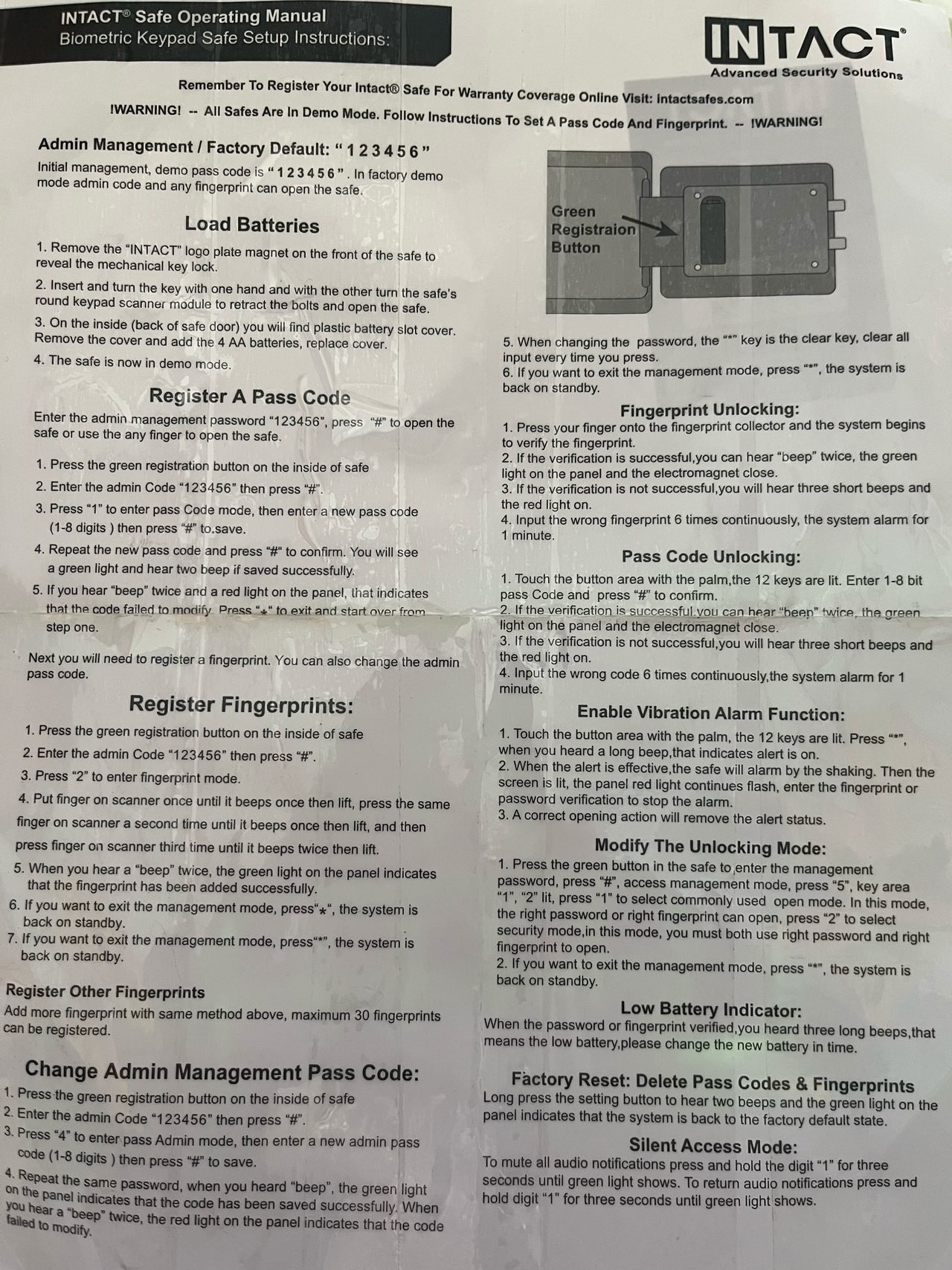
Advanced Security Remember To Register Your Intact® Safe For Warranty Coverage Online Visit: intactsafes.com IWARNING! – All Safes Are In Demo Mode. Follow Instructions To Set A Pass Code And Fingerprint. – WAARNING
Admin Management / Factory Default: " 1 2 34 56" Initial management, demo pass code is " 123456". In factory demo mode admin code and any fingerprint can open the safe. Load Batteries
- Remove the "INTACT" logo plate magnet on the front of the safe to reveal the mechanical key lock.
- Insert and turn the key with one hand and with the other turn the safe's round keypad scanner module to retract the bolts and open the safe.
- On the inside (back of safe door) you will find plastic battery slot cover. Remove the cover and add the 4 AA batteries, replace cover.
- The safe is now in demo mode. Register A Pass Code Enter the admin management password "123456", press "#" to open the safe or use the any finger to open the safe.
- Press the green registration button on the inside of safe
- Enter the admin Code "123456" then press "#"
- Press "1" to enter pass Code mode, then enter a new pass code (1-8 digits) then press "#" "#"to.save.
- Repeat the new pass code and press "#" to confirm. You will see a green light and hear two beep if saved successfully.
- If you hear "beep" twice and a red light on the panel, that indicates that the code failed to modify Press "*" to exit and start over from step one. Next you will need to register a fingerprint. You can also change the admin pass code. Register Fingerprints:
- Press the green registration button on the inside of safe
- Enter the admin Code "123456" then press "#".
- Press "2" to enter fingerprint mode.
- Put finger on scanner once until it beeps once then lift, press the same finger on scanner a second time until it beeps once then lift, and then press finger on scanner third time until it beeps twice then lift.
- When you hear a "beep" twice, the green light on the panel indicates that the fingerprint has been added successfully.
- If you want to exit the management mode, press"*", the system is back on standby.
- If you want to exit the management mode, press"* ", the system is back on standby. Register Other Fingerprints Add more fingerprint with same method above, maximum 30 fingerprints can be registered. Change Admin Management Pass Code:
- Press the green registration button on the inside of safe
- Enter the admin Code "123456" then press "#"
- Press "4" to enter pass Admin mode, then enter a new admin pass code (1-8 digits) then press "#" to save.
- Repeat the same password, when you heard "beep", the green light on the panel indicates that the code has been saved successfully. When failed to modify. you hear a "beep" twice, the red light on the panel indicates that the code failed to modify
- When changing the password, the ** key is the clear key, clear all input every time you press.
- If you want to exit the management mode, press "*", the system is back on standby. Fingerprint Unlocking:
- Press your finger onto the fingerprint collector and the system begins to verify the fingerprint.
- If the verification is successful, you can hear "beep" twice, the green light on the panel and the electromagnet close.
- If the verification is not successful, you will hear three short beeps and the red light on.
- Input the wrong fingerprint 6 times continuously, the system alarm for 1 minute. Pass Code Unlocking:
- Touch the button area with the palm, the 12 keys are lit. Enter 1-8 bit pass Code and press "#" to confirm.
- If the verification is successful you can hear "heen" twice, the green light on the panel and the electromagnet close.
- If the verification is not successful, you will hear three short beeps and the red light on.
- Input the wrong code 6 times continuously,the system alarm for 1 minute. Enable Vibration Alarm Function:
- Touch the button area with the palm, the 12 keys are lit. Press *** when you heard a long beep, that indicates alert is on.
- When the alert is effective, the safe will alarm by the shaking. Then the screen is lit, the panel red light continues flash, enter the fingerprint or password verification to stop the alarm.
- A correct opening action will remove the alert status. Modify The Unlocking Mode:
- Press the green button in the safe to enter the management password, press "#" , access management mode, press "5", key area "1", "2" lit, press "1" to select commonly used open mode. In this mode, the right password or right fingerprint can open, press "2" to select security mode, in this mode, you must both use right password and right fingerprint to open.
- If you want to exit the management mode, press ** , the system is back on standby. Low Battery Indicator: When the password or fingerprint verified, you heard three long beeps,that means the low battery,please change the new battery in time. Factory Reset: Delete Pass Codes & Fingerprints Long press the setting button to hear two beeps and the green light on the panel indicates that the system is back to the factory default state. Silent Access Mode: To mute all audio notifications press and hold the digit "1" for three seconds until green light shows. To return audio notifications press and hold digit "1" for three seconds until green light shows.