
The Goal Machine
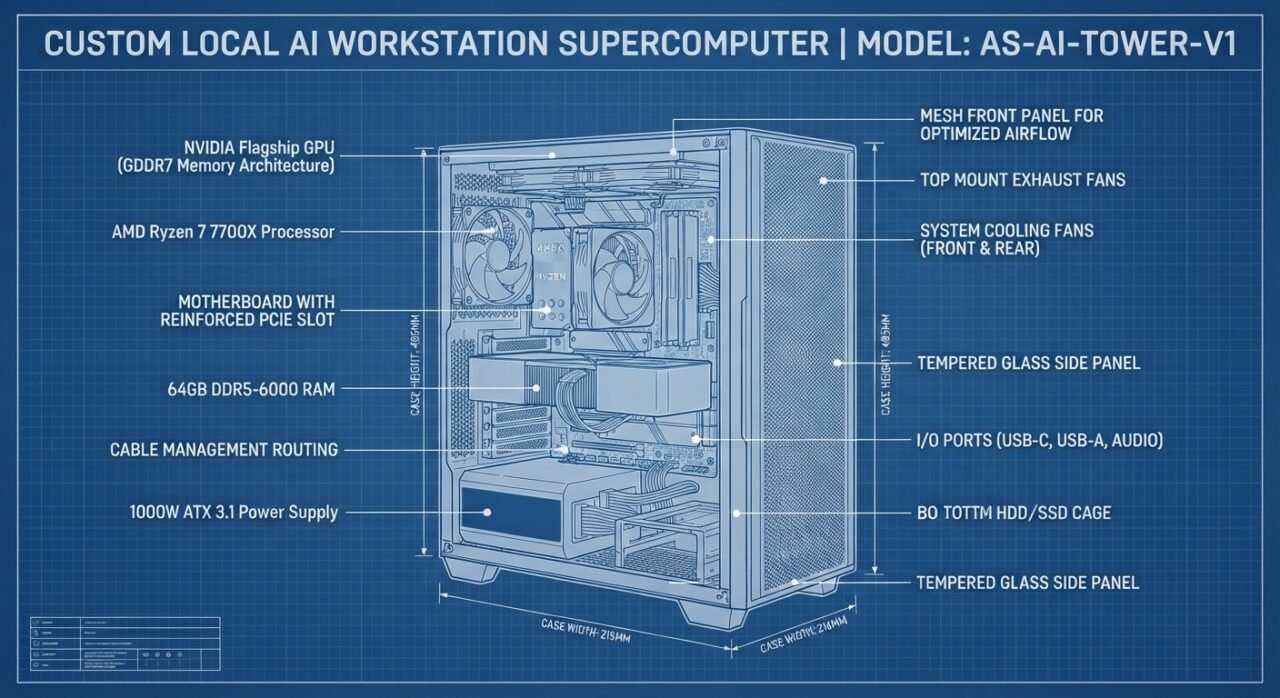
Graphics Processing Unit (GPU): NVIDIA Flagship Desktop GPU (Blackwell Architecture Tier)
- Video Memory: 16GB GDDR7 VRAM
- Memory Bus Width: Next-generation high-bandwidth memory interface
- Hardware AI Accelerators: 5th-Generation Tensor Cores with native FP4/FP8 data format support
- AI TOPS: 1,800+ operational trillions of calculations per second
Central Processor (CPU): AMD Ryzen 7 7700X
- Core Configuration: 8 Cores / 16 Threads
- Architecture: Zen 4 platform running on long-term upgradeable AM5 socket topology
- Clock Speeds: 4.5GHz Base / 5.4GHz Max Turbo Boost
System RAM: 64GB DDR5 Dual-Channel Workstation Kit
Configuration: 2 x 32GB Modules (optimized for maximum AMD memory controller stability)
Speed & Latency Profile: 6000MHz at CL30 timing specs
Primary AI Weight Storage (SSD): Samsung 990 EVO 1TB NVMe M.2 SSD
- Interface: PCIe Gen 4.0 x4 backwards-compatible setup
- (Reused from your Razer Blade Stealth stash to preserve budget).
Power Supply Unit (PSU): Corsair RM1000x (or equivalent Tier-A premium unit)
- Wattage Rating: 1000 Watts continuous output
- Efficiency Certification: 80+ Gold certified
- Standard Compliance: ATX 3.1 native layout with dedicated PCIe 5.0 high-wattage power delivery architectures
Motherboard: MSI MAG B650 Tomahawk WiFi (or ASUS TUF Gaming B650-Plus)
- Form Factor: Full-scale ATX footprint
- Structural Engineering: Heavy steel-reinforced PCIe x16 slot to prevent GPU structural sag
Thermal System & Chassis: Heavy Workstation Mesh Airflow Tower
- CPU Cooling: Thermalright Peerless Assassin 120 SE dual-tower, dual-fan configuration
- Chassis System: Montech AIR 903 MAX (Mesh front profile with 4 integrated high-CFM system cooling fans)
- 8B Parameter Models (e.g., Llama-3 8B, Mistral 7B): Loads completely natively into your GDDR7 VRAM pool at full unquantized precision. Token generation speeds will hover past 65+ tokens per second (faster than human reading speeds).
- 32B / 70B Quantized Architectures: Fully compatible via unified memory offloading layers, utilizing your massive 64GB system memory buffer to run enterprise-scale models completely locally with total offline data privacy.
🧠 The Core Intelligence Engine
🎛️ Memory & Storage Pipelines
🔌 Power & Architectural Infrastructure
🎯 The AI Workload Target Metrics
Edists clarification to goal machine
Yes—this is a capable local-AI desktop plan. But the description oversells what 16GB of GPU memory can do. The biggest thing to settle is the GPU, not the CPU or case.
First: name the actual graphics card
Your combination of Blackwell, 16GB GDDR7, and approximately 1,800 AI TOPS matches the NVIDIA GeForce RTX 5080. Its actual memory interface is 256-bit, with 960GB/s bandwidth. It is a high-end card, but not the flagship—the RTX 5090 has 32GB VRAM.[nvidia +1]
So replace:
NVIDIA Flagship Desktop GPU — Blackwell Architecture Tier
with:
NVIDIA GeForce RTX 5080 — 16GB GDDR7, 256-bit memory interface
That turns marketing language into an actual component you can price and compare.
The AI performance claims need correcting
“8B models fit at full unquantized precision” is not a safe promise
At FP16/BF16, model weights require roughly two bytes per parameter. An 8B model therefore needs roughly 16GB for weights alone, before the conversation’s KV cache and runtime overhead. NVIDIA’s own example puts Llama 3.1 8B’s unquantized weight memory at 16.06GB.[developer.nvidia]
For a 16GB card, the sensible target is quantized 7B/8B models, leaving room for context and runtime memory—not an assurance that unquantized 8B models fit comfortably. Quantization reduces weight memory, while longer context still increases memory requirements.[developer.nvidia]
“65+ tokens per second” needs a benchmark attached
That figure is not established by the specifications you pasted. You would need to name the model, quantization, inference software, context length, and test conditions. NVIDIA’s 1,801 AI TOPS rating is a hardware capability figure, not a measured chat-generation speed.[nvidia +1]
I would remove the promise until you have a benchmark for the exact setup.
64GB system RAM does not turn 16GB VRAM into an 80GB GPU
Software such as llama.cpp can split work between CPU and GPU to run models larger than available VRAM. That is CPU/GPU hybrid inference, not a unified high-bandwidth GPU memory pool.[amd]
That makes larger quantized models an option to experiment with, but “can load and run” is different from “runs at a speed you’ll enjoy.” I would describe 32B/70B support as conditional on the model format, quantization, context length, and offloading configuration—not a blanket compatibility guarantee. Those variables directly affect memory needs.[developer.nvidia +1]
What I would keep—and what I would qualify
Component
My assessment
Ryzen 7 7700X
Keep it on the shortlist. An eight-core, 16-thread CPU is a reasonable supporting processor here; the unresolved question is how much of your budget remains for GPU memory.
64GB RAM, 2 × 32GB
Keep the capacity target. It supports the larger-model experimentation you described, without pretending to replace VRAM.
DDR5-6000 CL30
Good target, but not guaranteed plug-and-play speed. AMD officially rates the 7700X for DDR5-5200 with two DIMMs; EXPO is memory overclocking. Choose a tested kit and validate stability.
Reused Samsung 990 EVO 1TB
Keep it in the plan—you already have it, so there is no need to buy storage simply to complete a new-parts checklist.
B650 motherboard
Keep either candidate on the shortlist, but choose an exact board rather than leaving alternatives in the final bill of materials.
1000W PSU
Treat this as a purchasing specification, not a completed selection. Confirm the exact model/revision, ATX standard, and included GPU power cable.
Air cooler and mesh case
Sensible direction for your straightforward air-cooled tower. Check the exact GPU dimensions, cooler clearance, and RAM clearance before ordering.
The keep/qualify decisions above are my assessment of your proposed build, not a completed compatibility certification.
The decision that matters most for your goal
For local LLMs, I would compare GPU memory capacity before paying extra for the headline TOPS figure. NVIDIA’s lineup includes 16GB cards at several performance levels, while its comparison table lists 24GB on the RTX 3090 and 32GB on the RTX 5090. More VRAM can let you keep a larger model—or more context—on the GPU instead of relying on offloading.[nvidia +2]
That does not automatically make a used 3090 the better purchase. Price, condition, power consumption, warranty, and your intended models still matter. But it does mean a 5080 is not automatically the best local-LLM choice just because it is newer.
A more accurate goal-machine description
An air-cooled local-AI workstation built around an NVIDIA GPU, Ryzen 7 7700X, 64GB DDR5 RAM, and a reused 1TB NVMe SSD. With an RTX 5080 16GB, the primary target is GPU-resident quantized 7B/8B models. Larger quantized models can be explored through CPU/GPU offloading, with performance and memory requirements depending on the model, context length, and software configuration.
The overall plan is good. I would finalize the exact graphics card and total price before calling it the final build—and remove the unquantized-8B and guaranteed-speed claims.
CRUFT FOR SALE
1. Title
Razer Blade Stealth 13 (2020) | i7-1065G7 | 16GB RAM | 512GB SSD | GTX 1650
Description
Selling my Razer Blade Stealth 13 (2020), a compact laptop with a matte-black aluminum chassis and dedicated NVIDIA graphics. A versatile option for everyday work, school, creative projects, and gaming.
The laptop is in excellent cosmetic and working condition. Includes the original retail box and original Razer power adapter.
Specifications:
• Intel Core i7-1065G7 processor, up to 3.9GHz
• 16GB LPDDR4X RAM
• NVIDIA GeForce GTX 1650 dedicated graphics
• Newly installed 512GB NVMe SSD
• Clean installation of Windows 11 Home, activated and ready for setup
• Razer Chroma RGB keyboard
• Thunderbolt 3 connectivity
The screen has no dead pixels, all ports work, and the battery holds a good charge.
Shipping: Packed in the original Razer box and double-boxed for protection. Tracking and insurance included.
Reasonable offers welcome.
—
2. Title
VITURE One Gen 1 XR Glasses | Like New | Original Box, Case & Cable
Description
Selling my VITURE One first-generation XR glasses in like-new condition with very little use. Great for enjoying a private virtual display for movies, compatible gaming devices, or mobile computing.
Includes:
• VITURE One Gen 1 glasses in Jet Black
• Original protective carrying case
• Original magnetic USB-C cable
• Interchangeable nose pads
• Original retail box and documentation
Features include adjustable myopia focus dials and electronic lens dimming. The glasses have been cleaned and tested and are ready for their next owner.
Device compatibility varies; please confirm whether your device supports these glasses directly or requires an adapter. Additional adapters are not included.
Shipping: Carefully packed in the original box and double-boxed, with tracking.
Reasonable offers welcome.
—
3. Title
Elgato Thunderbolt Dock + Apple Adapters & Cables | Legacy Mac Accessory Lot
Description
Selling a bundle of legacy Thunderbolt and display accessories from an older workstation setup. Useful for someone maintaining compatible older Mac hardware or looking for spare cables and adapters.
Includes:
• Elgato Thunderbolt 1 dock
• One white Thunderbolt cable, approximately 1 meter
• One white Thunderbolt cable, approximately 0.5 meter
• Two Apple Thunderbolt adapters; see photos for exact connectors and model markings
• One DisplayPort-to-DVI adapter
• One AmazonBasics DisplayPort-to-HDMI adapter
📋 Listing 2: The Ultimate Legacy Thunderbolt 1 Accessory Loot Box
Instead of trying to sell six individual $5 adapters and getting destroyed by shipping labels, bundle all the legacy thunderbolt and display cords together as one massive “Vintage Apple Workstation Rescue Kit.” Legacy Mac Mini, vintage MacBook Pro, and old iMac collectors jump on cable bundles like this instantly to wire up their studio gear.
Title:
Legacy Apple Studio Loot Pack: Elgato TB1 Hub • Thunderbolt 1 & 2 Cables • Adapters
Description:
markdown
Selling a massive, complete legacy connectivity lot perfect for retro Apple collectors, audio engineers, or vintage Mac studio hobbyists. If you are trying to bridge older Thunderbolt 1/2 gear, displays, and legacy peripherals, this box has everything you need.
🔌 WHAT IS INCLUDED IN THIS ACCESSORY LOT:
- Elgato Thunderbolt 1 Dock / Hub: Premium aluminum desktop hub. Includes the unit only (Sold as-is/untested—powers on fine, just clearing it out of a storage drawer).
- Thunderbolt 1 Data Cables: Includes (1) 1-Meter white cable and (1) 0.5-Meter white cable.
- Apple Thunderbolt Adapters: Includes (2) Official Apple Thunderbolt 1 to Thunderbolt 2/3 translation blocks.
- Video Display Adapters: Includes (1) DisplayPort to DVI adapter and (1) AmazonBasics DisplayPort to HDMI adapter.
Selling everything completely together as one single lot. Perfect for anyone maintaining an older music/editing workspace or legacy hardware collection.
📦 SHIPPING: Buyer pays shipping. Fast transit with tracking.
Use code with caution.
Recommended List Price: $65
Lowest Acceptable Price: $40 – $45 (The two Apple adapters alone are worth $15 a piece to collectors, so this whole block will disappear quickly).
4. Title:
Segway Ninebot Drift W1 Electric Roller Skates Hovershoes (With Charger
Description:
markdown
Selling a pair of Segway Ninebot Drift W1 Electric Roller Skates / Hovershoes in great working condition. Honestly, this was an impulse buy that just sits in my closet, so it’s time to pass them on to someone who wants to try them out!
🛴 CONDITION & SPECS:
• Low total hours of use. Does show some minor cosmetic scuffs on the plastic bumpers from casual pavement testing, but structurally solid.
• Balancing technology, sensors, and dual motors work perfectly and hold a great charge.
• Includes: Both electric skates and the original dual-charging power brick/cord. No original box.
Super fun, unique gadget for cruising around flat pavement, parks, or smooth surfaces. Surprisingly easy to pick up if you have decent balance!
📦 SHIPPING: Heavy item—buyer pays shipping. Will be wrapped extensively in heavy-duty bubble wrap and packed securely inside a strong box to ensure safe transit.
Feel free to send a reasonable offer or ask any questions!
Use code with caution.
💰 Adjusted Pricing Strategy
Since you don’t have the original retail box, we should adjust your bottom dollar slightly to keep it moving fast:
Recommended List Price: $125 (Leaves room for the inevitable bargain hunters to submit an offer)
Lowest Acceptable Price: $80 – $90 (Still a great cash injection for something sitting around collecting dust!)
5. Title:
AKiTiO Node Titan eGPU + AMD Radeon RX 6800 16GB + Premium TB3 Cable BUNDLE
MSI Radeon RX 6800 GAMING X Trio 16GB GDDR6 Graphics Card
US $395.43
Description:
Selling a complete, ready-to-plug-and-play eGPU setup in flawless working condition. This is the ultimate graphics boost for handheld gaming PCs (ROG Ally, Legion Go, GPD Win), MacBooks, or Intel/AMD Thunderbolt laptops.
Everything comes packed in its ORIGINAL RETAIL BOX with original packaging inserts!
🎮 WHAT’S INCLUDED IN THIS BUNDLE:
- AKiTiO Node Titan Thunderbolt 3 Enclosure: Premium, toolless aluminum housing with an integrated 650W power supply. Clean, quiet, and reliable.
- AMD Radeon RX 6800 Graphics Card: Features a massive 16GB of VRAM. It has been installed with a custom interior reinforcement brace to ensure zero PCIe slot sag and maximum safety during transit.
- Verified Thunderbolt 3 Cable: High-performance, high-bandwidth data cable required for eGPU stability (cheap cables cause crashes, this one is tested and rock-solid).
- Power cable and original documentation.
This setup completely transforms a thin-and-light laptop or handheld console into a full-scale desktop gaming and rendering powerhouse via a single cable connection. Wiped, tested, and ready to ship immediately.
📦 SHIPPING: Ships fast and securely in its original box, double-boxed for protection. Tracking and insurance included. Signature required upon delivery due to value.
Feel free to send a reasonable offer or ask any questions!
Use code with caution.
💰 Recommended Pricing Strategy for this Listing:
List Price: $460 (This gives you plenty of room to let buyers “negotiate” you down via the offer button).
Lowest Acceptable Price: $400 – $420 (A very fair, fast-moving price for an enclosure + an RX 6800 16GB together).
Go ahead and get that eGPU bundle posted! When you’re ready, let me know:
6. Title:
HP Z24n G2 24” Workstation Monitor • 16:10 IPS • Custom Air-Column Box
Description:
markdown
Selling a professional-grade HP Z24n G2 24-inch Workstation Monitor in flawless physical and operational condition.
This is from HP’s premium, color-accurate enterprise workstation lineup—built with a stunning IPS panel designed specifically for creators, developers, designers, and office power-users who need perfect color reproduction and crisp text.
🖥️ MONITOR FEATURES & SPECS:
• Aspect Ratio: 16:10 WUXGA (1920 x 1200 resolution). Gives you extra vertical screen real estate compared to a standard widescreen 1080p monitor—perfect for viewing code lines, spreadsheets, or timeline tracks.
• Panel Type: Premium IPS with micro-edge bezels on 3 sides for a seamless multi-display setup.
• Refresh Rate / Response: 60Hz / 5ms response time.
• Connectivity: Loaded with modern inputs including DisplayPort, HDMI, DVI, and integrated USB hub ports.
• Ergonomic Stand: Fully adjustable factory stand supporting height adjustment, tilt, swivel, and full 90-degree pivot rotation for vertical/portrait viewing.
📦 THE PREMIUM PACKAGING ADVANTAGE (SHIPS SAFELY!):
Buyers are usually terrified of ordering monitors online because they arrive shattered due to bad packing. You do not have to worry about that here! This monitor comes packed inside a specialized, heavy-duty electronics shipping box equipped with custom, custom-fit inflatable air-column sleeves. This inflatable rib case creates an absolute shock-absorbing suspension shield around the panel, ensuring it arrives at your doorstep in pristine condition.
Includes: HP Z24n G2 monitor, heavy-duty ergonomic stand, power cord, and the custom inflatable shipping box protection kit. Wiped down, fully tested, and ready to ship out immediately.
🚚 SHIPPING: Buyer pays shipping. Fast transit with tracking and insurance entirely included.
Feel free to send a reasonable offer or ask any questions!
Use code with caution.
💰 Recommended Pricing Strategy
Recommended List Price: $115 (That specialized air-column box lets you price with total confidence!)
Lowest Acceptable Price: $80 – $95
7. Title:
Asustor AS5202T Nimbustor 2 NAS • Upgraded 8GB RAM • 8TB Total Storage Bundle
Description:
markdown
Selling a premium, high-speed Asustor AS5202T Nimbustor 2-Bay NAS Personal Cloud Server. This bundle is 100% complete, fully configured, and ready to deploy right out of the box—no hunting down expensive separate hard drives!
This unit has been meticulously maintained, running excellent operating diagnostics (System Temp: 49°C / CPU Temp: 51°C) and comes packed in its ORIGINAL RETAIL BOX with original cables and the OEM power brick.
📡 PREPARED POWER-USER UPGRADES:
• Upgraded Memory: Maxed out to 8GB DDR4 System RAM (Massive upgrade over the restrictive stock 2GB model—crucial for smooth Plex streaming, Docker containers, and multi-user access).
• Intel Celeron Dual-Core 2.0GHz Processor with hardware-accelerated 4K transcoding.
• Dual 2.5GbE Ethernet Ports: High-speed networking capabilities.
💾 STORAGE DRIVES INCLUDED (8TB TOTAL):
• Contains (2) matching Seagate IronWolf Pro 4TB NAS Hard Drives (Model: ST4000NE001).
• IronWolf health status & S.M.A.R.T. diagnostics are completely verified as HEALTHY/GOOD with zero bad sectors.
Both drives have been securely wiped and the NAS has been factory reset to the latest stable firmware, completely ready for your own private setup.
📦 SHIPPING: Buyer pays shipping. Will be securely bubble-wrapped inside its factory retail packaging and double-boxed for ultimate transit safety. Tracking and insurance included.
Use code with caution.
💰 The Financial Strategy Update
By packaging the 8GB RAM upgrade and the 8TB of high-end IronWolf Pro storage into one listing, you can firmly step up your pricing: [1, 2]
Recommended List Price: $395 (Allows healthy negotiating room)
Lowest Acceptable Price: $320 – $340
8. Title:
CMF by Nothing Watch Pro 2 Smartwatch (Minimalist Dark Gray / Ash)
Description:
Selling a CMF by Nothing Watch Pro 2 smartwatch in excellent condition. This is Nothing’s ultra-clean, minimalist smartwatch known for its beautiful dot-matrix UI and incredible battery life.
✨ CONDITION & HARDWARE:
• Excellent structural shape, screen is pristine and scratch-free.
• Battery health is incredible (easily lasts over a week on a single charge).
• Includes: Watch Pro 2 unit, original liquid silicone strap, the magnetic USB charging cable, and the original box!
Features a smooth 60Hz AMOLED screen, built-in GPS tracking, and a modular aluminum frame where you can swap out the front bezels. Fully reset, unpaired from my phone, and ready to ship immediately.
📦 SHIPPING: Buyer pays shipping. Will be carefully packed inside its retail box and safely double-boxed for transit.
Condition: The Elgato dock powers on but has not been fully tested. It is being sold as-is. The dock’s power adapter is not included. Cable and adapter condition is shown in the photos; no additional functional testing is claimed.
Please check the pictured connectors and model numbers against your equipment before purchasing.
Selling as one complete lot, not individually.
Shipping: Buyer pays shipping. Everything will be securely packed, with tracking provided.
9. Title:
Open Box Creality Ender 3 V2 + Sonic Pad + 10W Laser Bundle (NEVER USED)
Description:
markdown
Selling a complete, high-end maker bundle that is essentially brand new. Bought with the best intentions to set up a high-speed Klipper 3D printing and laser engraving station, but it was never actually assembled or run. Not even once! Zero hours of use on all components.

Everything comes 100% complete in its ORIGINAL RETAIL BOXES with all factory packaging inserts, cables, and tools.

Selling my Creality Ender 3 V2 with a Creality Sonic Pad and 10W laser module. Bought for a maker project that I never got around to finishing.
The printer has never been used to print anything, and the bed has never been leveled. This is an unfinished setup project—not a calibrated, tested, ready-to-print machine.


📦 WHAT IS INCLUDED IN THIS UNUSED MEGAPACK:
1. Creality Ender 3 V2 3D Printer: Open box, pristine condition. The nozzle, heated bed, belts, and motors have zero wear and tear because it has never seen a single strand of plastic filament.
2. Creality Sonic Pad (7" Touchscreen): Brand new in box. The ultimate Klipper firmware upgrade screen to unlock insane speeds and web-control features.
3. Creality 10W Laser Engraver Module: Brand new in box. Easily mounts to the machine to instantly convert your setup into a high-precision wood/plastic laser cutter and engraver.
4. Every single factory manual, hex wrench, power cord, and accessory that came from the manufacturer.

If you want a brand-new, modern 3D printing and laser setup without paying full retail tax, this is the perfect project kit. Ready to ship immediately.

🚚 SHIPPING: Packaged meticulously in all original factory boxes, double-boxed for ultimate transit protection. Tracking and insurance included.

Feel free to shoot over a reasonable offer!
Use code with caution.
💰 The "Pristine Tax" Pricing Strategy
Because it is effectively new hardware, you can firmly hold your ground on the price:
- List Price: $340
- Lowest Acceptable Price: $280 (Buyers will gladly pay a $20–$30 premium knowing they are getting untouched, factory-fresh hardware instead of someone else's clogged and broken project printer).
Creality Ender 3 V2 + Sonic Pad (Klipper Tuned) + 10W Laser Bundle
Description:
markdown
Selling a completely upgraded, high-speed, fully tuned maker station. This bundle takes the reliability of the Ender 3 V2 and supercharges it into a modern, lightning-fast machine running Klipper firmware.

The best part? It is 100% configured, calibrated, and actively working right out of the box—no pulling your hair out trying to flash firmware or fix config files.

📦 WHAT’S INCLUDED IN THIS BUNDLE:
1. Creality Ender 3 V2 3D Printer: Meticulously maintained and physically dialed-in for clean layer lines.
2. Creality Sonic Pad (7" Touchscreen): The brain of the operation. Fully set up and actively running Klipper firmware. Enables incredibly fast print speeds, macro controls, and real-time mobile/web monitoring interfaces. Comes with its original retail box.
3. Creality 10W Laser Engraver Module: Easily clips onto the printer to instantly transform your setup from a 3D printer into a high-precision laser wood/plastic engraver.
4. All original boxes, packaging inserts, power cables, and stock accessories are included!

Skip the configuration nightmare and buy a system that is already fine-tuned and ready to produce models and engravings on Day One. Wiped, tested, and packed securely.

🚚 SHIPPING: Packed safely inside original boxes, double-boxed for protection. Tracking and insurance included. Free local pickup if you are in the San Francisco area!
Use code with caution.
💰 Recommended Pricing Strategy
- List Price: $310 (Allows room for buyers to submit an offer).
- Lowest Acceptable Price: $250 – $260 (A very healthy payout that pushes you much closer to that RTX 5080 local AI tower fund).
10. Title
Xencelabs Pen Tablet Medium + Quick Keys | Pens & Accessories | Like New
Description
Selling my Xencelabs Pen Tablet Medium together with the Xencelabs Quick Keys shortcut controller, pens, and accessories. Everything is in like-new condition.
A complete tablet-and-controller bundle for a creative workstation, whether you’re drawing, editing photos, or working on design projects.
Includes:
• Xencelabs Pen Tablet Medium
• Xencelabs Quick Keys module
• Pens
• Included accessories shown in the photos
Selling everything together as one bundle. Please see photos for the condition and exact contents.
Reasonable offers welcome.
what shoudl ti coset?
For your like-new Xencelabs Pen Tablet Medium + Quick Keys + pens and accessories, I’d list it at $175 and aim to accept $140–$160.
Suggested pricing
Asking price with room for offers
$175
Goal
My suggested price
Reasonable offer to accept
$140–$160
Quick-sale price
$125–$135
These are estimated resale targets, not verified completed-sale prices.
Why I’d price it there
Xencelabs currently lists the original Medium bundle with Quick Keys at $264 new, discounted from $329.99. That makes $175 a meaningful discount while still giving you credit for the like-new condition and included accessories.[xencelabs]
However, an Amazon search result advertises a matching-looking original-generation bundle at $149.99. I couldn’t verify the exact offer or availability from that result, so treat it cautiously—but if buyers can actually purchase the same complete bundle new for $150, you’d likely need to price yours around $110–$125 to compete.[amazon]
My starting move: $175, buyer pays shipping, reasonable offers welcome. That assumes this is the original Medium model, not the newer v2.
Profit and loss
so how does it look with the 10% take from mercari – for all of this –
and compare it to the cost fo the goal machine?
Selling all 10 would give you roughly $1,500–$2,000 after Mercari’s 10% fee, before shipping-related deductions and packing costs.
That is a substantial desktop fund—but the RTX 5080 version of your goal machine currently looks closer to $2,665–$3,250 before tax. The GPU’s current price is the biggest obstacle, not the rest of the tower. Recent retail checks put available RTX 5080 cards around $1,900–$2,200 rather than their original $999 starting price.[ign +1]
What the 10 items could bring in
This uses our existing draft prices, with provisional estimates for the laptop and watch, which we hadn’t priced yet. These are planning scenarios, not verified sold-comparable valuations.
Razer Blade Stealth 13*
$250
$350
$225–$315
VITURE One glasses
$110
$150
$99–$135
Thunderbolt dock/accessory bundle
$40
$65
$36–$58.50
Ninebot Drift W1 hovershoes
$80
$125
$72–$112.50
Node Titan + RX 6800 bundle
$400
$460
$360–$414
HP Z24n G2 monitor
$80
$115
$72–$103.50
Asustor NAS + two drives
$320
$395
$288–$355.50
CMF Watch Pro 2*
$25
$40
$22.50–$36
Xencelabs tablet + Quick Keys
$125
$175
$112.50–$157.50
Creality printer/Sonic Pad/laser bundle
$250
$340
$225–$306
Item
Total
Conservative sale
$1,680
$2,215
Asking-price target
After 10% fee, conservative–target
$1,512–$1,993.50
The laptop’s $250–$350 and watch’s $25–$40 ranges are placeholders for this budget calculation, not researched valuations. The printer’s range also remains provisional because it is unused but untested.
The upper total assumes everyone pays your asking price. I’d budget around $1,700–$1,800 in proceeds rather than spend against the full $1,993.50.
Mercari’s shipping wrinkle
Mercari charges its 10% seller fee on both the item price and buyer-paid shipping—not just the item price.[mercari +1]
So the table is a simplified item-price calculation:
• If buyers pay $200 in shipping across the listings, another $20 comes out in seller fees.
• If you offer free shipping, the shipping cost itself comes out of your proceeds.
• Boxes, packing materials, and any separately purchased coverage also reduce your fund.
Several of our descriptions say “tracking and insurance included.” Make sure those promises match the shipping option you actually choose before posting.
Cost of your goal machine
Here is a planning budget for the build you described. The GPU range reflects recent market reporting; the other figures are budgeting allowances, not a verified checkout cart.[ign +1]
RTX 5080 16GB
$1,900–$2,200
Ryzen 7 7700X
$200–$250
B650 motherboard
$150–$200
64GB DDR5-6000 CL30
$150–$250
Corsair RM1000x or comparable PSU
$150–$200
Montech AIR 903 MAX
$80–$100
Thermalright Peerless Assassin cooler
$35–$50
Reused Samsung 990 EVO 1TB
$0 additional
Component
Estimated total before tax
$2,665–$3,250
Planning allowance
This excludes a Windows license, peripherals, assembly charges, and any shipping charges on the parts.
How close would you be?
Conservative
$1,512
$1,153
$1,738
Sale outcome
All asking-price targets achieved
$1,993.50
Proceeds after simplified 10% fee
$671.50
Gap to $2,665 build
$1,256.50
Gap to $3,250 build
Sales tax on the computer would increase those gaps, and selling expenses would slightly reduce your proceeds.
The practical takeaway
Your clutter can fund a meaningful AI-desktop budget. It just doesn’t currently fund that exact RTX 5080 machine outright.
The key distinction is:
• At a hypothetical $999 GPU price, the same component allowances put the tower around $1,764–$2,049 before tax—much closer to your sale proceeds.
• At the recently reported $1,900–$2,200 GPU prices, the card alone consumes approximately your entire sale fund.[ign +1]
I would sell the gear first, treat about $1,700 as the working fund, and choose the exact GPU against real available prices rather than lock yourself into the 5080 name. I’ve also included the proceeds spreadsheet as a CSV so you can adjust the sale prices as offers arrive.
shit!!. Recent retail checks put available RTX 5080 cards around $1,900–$2,200 rather than their original $999 starting price
we can’t get anywher near the 2250 goal then.
how long is this price gougoing going on for ? forever?
Not necessarily forever—but there is no reliable end date, and I wouldn’t promise you that waiting a month or two will bring the RTX 5080 back to $999. NVIDIA has acknowledged supply constraints, and recent reporting still shows sharply inflated prices.[ign]
And yes, that is frustrating: the same build changes from achievable to out of budget without becoming a better computer.
What’s actually happening?
It appears to be more than individual sellers marking cards up. Recent reporting points to limited GPU availability, strong demand, and memory shortages. A late-October survey of several US retailers found the cheapest available RTX 5080 offers starting around $1,980.[notebookcheck]
However, shortage reports do not establish a date when prices will normalize. Nvidia’s 5080 and 5090 marketplace categories reportedly returned by November 2, but both remained out of stock—so a store listing reappearing is not the same thing as affordable supply returning.[pcmag]
Does that mean years of these exact prices?
No one can establish that from the available evidence.
PCMag reports a memory supplier’s expectation that broader memory shortages could persist through 2030. That is not a forecast that an RTX 5080 will cost $2,000 until 2030. It is a wider supply outlook, not a price guarantee for this particular card.[pcmag]
The honest distinction is:
• A return to $999 soon: not something we can count on.
• Prices staying at today’s level forever: also not established.
• Waiting a fixed number of weeks and getting a predictable discount: no reliable basis for that promise.
Your $2,250 goal isn’t dead—the exact 5080 build is the problem
Using the non-GPU allowances from our budget, the rest of the tower costs approximately $765–$1,050. That leaves:
$2,250 before tax
$1,200–$1,485
Total budget
Available for the GPU
$2,250 including tax
Less than that, depending on checkout tax
Those are planning figures from our earlier estimate, not current checkout quotes.
So you’re not suddenly unable to build an AI desktop. You’re unable to fit a roughly $2,000 GPU into that particular budget.
My recommendation: keep the $2,250 ceiling and make the GPU negotiable—not the other way around. Don’t pay nearly double the original starting price just to preserve “RTX 5080” on the parts list.
Also, I should have checked actual GPU availability before presenting that card as a realistic goal. Catching it now is better than after you bought the supporting parts, but it should have been checked earlier.
The corrected buying strategy
For your project, I would:
- Keep the $2,250 total ceiling.
- Compare the 5070 Ti against the 5080 for your intended 7B/8B-class work.
- Compare a tested 24GB used card if running larger models matters more than maximum small-model speed.
- Select the supporting CPU, motherboard, and PSU after choosing the best-value GPU—not spend the budget protecting an unnecessarily rigid parts list.
You’re absolutely right: if another card delivers the experience you want for less money, that’s the machine to build. The goal is a useful local-AI workstation—not owning a particular model number.
well – what gives us a simliiaer experies to the goal machine – and let’s see thje costof that –
then we can decide what we can live without?
The closest sensible alternative is an RTX 5070 Ti 16GB build: keep your Ryzen 7, 64GB RAM, and reused SSD, and reduce GPU speed rather than GPU memory capacity. A realistic planning total is approximately $1,885–$2,205 before tax—not the $2,665–$3,250 estimate for the inflated-price 5080 build.
There’s also an important correction: this lookup found lower advertised 5080 prices than my earlier blanket $1,900–$2,200 range. The retailer data is inconsistent, so we should treat these as advertised offers to verify—not guaranteed stock.
1. Closest to the goal: RTX 5070 Ti + 64GB RAM
The 5070 Ti preserves the original machine’s 16GB GDDR7 capacity, Blackwell architecture, fifth-generation Tensor Cores, and NVIDIA software ecosystem. NVIDIA specifies 1,406 AI TOPS versus the 5080’s 1,801—but those figures do not translate directly into a percentage difference in chat speed.[nvidia +1]
Proposed machine and cost
GPU
RTX 5070 Ti 16GB
$1,150–$1,250
CPU + motherboard
Ryzen 7 7700X + suitable B650/B650E board
$315–$375
RAM
64GB, 2 × 32GB DDR5
$150–$250 allowance
SSD
Your Samsung 990 EVO 1TB
$0 additional
PSU
Quality 850W ATX 3.1 unit
$140 allowance
Case
Montech AIR 903 MAX or comparable airflow case
$90–$140 allowance
CPU cooler
Thermalright dual-tower air cooler
$40–$50 allowance
Component
Total before tax
Selection
Budget
$1,885–$2,205
The GPU range is supported by Best Buy’s advertised $1,149.99–$1,249.99 listings. Newegg search results advertise a 7700X/ASUS B650E bundle at $314.99; the PSU and case figures are consistent with approximately $140 and $116 listings. The RAM and cooler figures remain budgeting allowances, not verified checkout quotes.[bestbuy +3]
For an illustrative 9% sales-tax allowance—not a verified tax rate for your address—the total becomes about $2,055–$2,405. That puts the lower-to-middle part of this plan within reach of $2,250.
What the experience keeps
• The same VRAM capacity as the original goal, so you retain broadly the same model-weight memory budget. Context and runtime overhead still matter.[nvidia +1]
• The same NVIDIA/Blackwell feature generation, including FP4-capable fifth-generation Tensor Cores.[nvidia]
• Your 64GB system RAM and eight-core CPU.
• GPU-resident quantized smaller-model use, with larger models explored through CPU/GPU offloading rather than pretending they fit entirely in 16GB.[nvidia +1]
What you give up
Some GPU throughput—not model intelligence. Running the same model with the same quantization does not make its answers worse merely because the GPU is slower. The main tradeoff is how long computation takes; the exact difference needs a matching-model benchmark rather than a TOPS calculation. NVIDIA’s inference-sizing guidance distinguishes model memory requirements from compute and performance requirements.[nvidia]
I would not promise “only 10% slower” or another specific figure from the evidence we have.
2. Cheaper option: RTX 5060 Ti 16GB + the same supporting machine
Best Buy advertises an ASUS RTX 5060 Ti 16GB at $788.99. Replacing the 5070 Ti with that card puts the same supporting build at approximately $1,524–$1,744 before tax, or about $1,661–$1,901 with the illustrative 9% allowance.[bestbuy]
16GB VRAM
Lower GPU performance tier
64GB system RAM
Longer waits should be expected; exact differences need workload benchmarks
Ryzen 7 7700X
No CPU downgrade
What stays
NVIDIA-based local-AI setup
Less emphasis on maximum speed
What changes
This is the budget fallback, not my claim of an equivalent-speed machine. It preserves the memory-capacity target while spending less on processing performance. NVIDIA’s comparison table distinguishes the 5060 Ti’s processing specifications from those of the 5070 Ti and 5080.[nvidia]
3. The original 5080 build might be less distant—but the price needs checking
The Best Buy page I retrieved advertises:
• ASUS Prime RTX 5080: $1,599.99.
• PNY and Gigabyte RTX 5080 models: $1,699.99.[bestbuy]
That conflicts with the higher-price reports I previously relied on. The retrieved page also contains outdated pickup dates, so I cannot honestly call these confirmed available-to-you deals.[bestbuy]
At an actually purchasable $1,600 GPU price, the supporting build above would total approximately $2,335–$2,555 before tax. Still over your ceiling, but considerably closer than I made it sound.
What I would cut—and what I wouldn’t
For the 5070 Ti machine, NVIDIA specifies 300W graphics power and a 750W required system-power recommendation. A good 850W PSU therefore offers a sensible alternative to your original 1000W target, subject to the exact card manufacturer’s requirements.[nvidia]
My priorities would be:
- Keep 16GB VRAM.
- Keep 64GB RAM initially, since larger-model experimentation is part of your goal.
- Use a less expensive suitable motherboard, rather than paying for a particular premium board name.
- Use a good 850W PSU instead of insisting on 1000W.
- Keep the reused SSD and straightforward air cooling.
- Choose the 5070 Ti before dropping to the 5060 Ti if the final checkout total fits.
The 5070 Ti build is the first one I’d try to land: roughly a $2,100–$2,250 all-in target with disciplined parts shopping, while preserving the original machine’s 16GB GPU memory and 64GB system memory. The 5060 Ti version is the lower-cost fallback if you decide speed is the compromise you can comfortably make.